
Reusable custom flow action to get all the catalog/producer variables as concatenated string
Import
·
Dec 17, 2023
·
article
We need the variables as a concatenated string to be used in description/other field.We need all the variables to be shared over email for approvers etc.
Implementation:
Creation of custom action
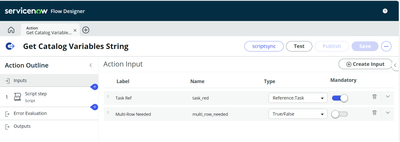
We will create a custom action Get Catalog Variables String with the inputs 1. Task Ref - Reference from task2. Multi-Row Needed - Boolean
and one output variable as msg.

We will be adding the JavaScript step where we will write the below script-
var vs = new global.GlobalServiceCatalogUtil().getVariablesForTask(inputs.task, inputs.ismulti);
var msg=    "";
    for (var i=0; i < vs.length; i++)
    {
        var isMRVS=lbl=vs[i].multi_row+"";
        var lbl=vs[i].label+"";
        var dis=vs[i].display_value+"";
        var visible=vs[i].visible_summary+"";
        if(isMRVS=='true')
        {
            var vArr=vs[i];
            msg+= lbl +"\n";
            for (var j=0; j < vArr.table_variable.length; j++)
            {
                msg+= "Row: " + (j+1)  + "\n";
                var tblArr=vArr.table_variable[j];
                for (var k=0; k < tblArr.length; k++)
                {
                    var mrvslbl=tblArr[k].label+"";
                    var mrvsdis=tblArr[k].display_value+"";
                    if(mrvslbl != '' && mrvsdis!='' && mrvsdis!='false')
                    {
                        msg+="\t"+ mrvslbl +  ": " + mrvsdis + "\n";
                    }
                }
                msg+="\n";
            }
        }
        else
        {
            if (lbl != '' && dis!='' && dis!='false' && visible=='true') {
                msg+= lbl + ": " + dis + "\n";
            }
        }

    }
    outputs.msg=msg;

Output variables:

Flow action output:

Setting script step output to the flow action output:

Custom action testing

Final test output:

(function runMailScript(/* GlideRecord */ current, /* TemplatePrinter */ template,
                                           /* Optional EmailOutbound */ email, /* Optional GlideRecord */ email_action,
                                           /* Optional GlideRecord */ event) {

    var vs = new GlobalServiceCatalogUtil().getVariablesForTask(current, true);     //current will be the RITM gliderecord, if notification is on approver table with source as RITM table ===> current.sysapproval.getRefRecord()
    for (var i=0; i < vs.length; i++)
    {
        var isMRVS=lbl=vs[i].multi_row+"";
        var lbl=vs[i].label+"";
        var dis=vs[i].display_value+"";
        var visible=vs[i].visible_summary+"";
        if(isMRVS=='true')
        {
            var vArr=vs[i];
            template.print("<div>"  + "<strong>" + lbl + "</strong></div><hr>");
            for (var j=0; j < vArr.table_variable.length; j++)
            {
                template.print("<div><strong>Row: </strong>" + (j+1)  + "</div>");
                var tblArr=vArr.table_variable[j];
                for (var k=0; k < tblArr.length; k++)
                {
                    var mrvslbl=tblArr[k].label+"";
                    var mrvsdis=tblArr[k].display_value+"";
                    if(mrvslbl != '' && mrvsdis!='' && mrvsdis!='false')
                    {
                        template.print("<div>"  + "<strong>" + mrvslbl + "</strong>" + ": " + mrvsdis + "</div>");
                    }
                }
                template.print("<hr>");
            }
        }
        else
        {
            if (lbl != '' && dis!='' && dis!='false' && visible=='true') {
                template.print("<div>"  + "<strong>" + lbl + "</strong>" + ": " + dis + "</div>");
            }
        }

    }
})(current, template, email, email_action, event);
| C | If you found value in this blog/article, I'd be grateful if you could either bookmark it or mark it as helpful. |
|---|
Labels:
View original source
https://www.servicenow.com/community/developer-blog/reusable-custom-flow-action-to-get-all-the-catalog-producer/ba-p/2765180