
List all approvals of inactive User
Hello,
Generally when the user leaves the organization, all the approvals that weare assigned to that user will be left unattended. So we had an requiremnt, where we wanted to send a summary of the list of approvals along with the count of approvals to the user's manager.
We need mainly 3 things.
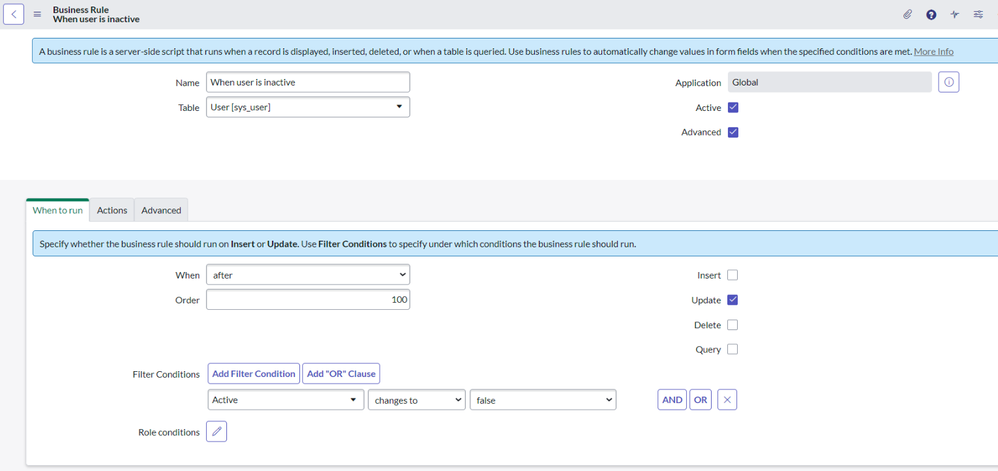
1. Business Rule to identify when the user gets inactive.
2. Event to trigger a notification
3. Notification and email script
Business Rule: When user Becomes InActive
When to run

Advanced

Script under Advanced:
(function executeRule(current, previous /*null when async*/) {
    // Add your code here
    gs.eventQueue('notify.manager.approvals',current,current.manager,current.sys_id.toString());
})(current, previous);
2. Event

3. Notification
When to Send

Who will receive

What it will contain

Mail Script: list_user_approvals
(function runMailScript( /* GlideRecord */ current, /* TemplatePrinter */ template,
    /* Optional EmailOutbound */
    email, /* Optional GlideRecord */ email_action,
    /* Optional GlideRecord */
    event) {
    // Fetch the no. of entities on which the approvals exist.
    var user_id = event.parm2.toString();
    var gr = new GlideAggregate("sysapproval_approver");
    gr.addEncodedQuery("approver=" + user_id + "^state=requested");
    gr.addAggregate('COUNT', 'sysapproval.sys_class_name');
    gr.query();
    var approval_types = [];
     var link = '<a href="' + gs.getProperty('glide.servlet.uri') + "sysapproval_approver_list.do?sysparm_query=approver%3D" + user_id + "%5Estate%3Drequested&sysparm_view=" + '"> Click her to view all approvals  </a>';
    template.print("<br>");
    template.print(link);
    template.print("<br>");

    while (gr.next()) {
        var obj = {};
        var approvalCount = gr.getAggregate('COUNT', 'sysapproval.sys_class_name');
        var approval_type = gr.getValue('sysapproval.sys_class_name');
        approval_types.push(approval_type);
        template.print("<br>Approvals for <b>" + approval_type + "</b> are " + approvalCount);
    }
    for (i = 0; i < approval_types.length; i++) {
        template.print("<br><h4>" + approval_types[i] + "</h4>");
        var grApproval = new GlideRecord("sysapproval_approver");
        grApproval.addEncodedQuery("approver=" + user_id + "^state=requested^sysapproval.sys_class_name=" + approval_types[i].toString());
        grApproval.query();
        while (grApproval.next()) {
            template.print("<br>Approval record is " + grApproval.sysapproval.getDisplayValue());
        }
    }
})(current, template, email, email_action, event);
Sample Output

Let me know if you have any questions in the comments below.
Mark the article as helpful and bookmark if you found it useful.
https://www.servicenow.com/community/developer-articles/list-all-approvals-of-inactive-user/ta-p/2506517