
Create RITMs for existing request through Flow Designer
Hello
In this article I will show you how you can create new RITMs for the existing request thorugh script.
Technically we create RITMs along with the request. If multiple RITMs, we can use cart API and can create multiple ritms as well there. However, if there is a requirement (not ideal) to create ritms after the request is created. In our case, we had to submit a catalog item request when a user is created.
I had used flow designer and invoked Submit catalog item Action of Flow designer.

As you can see, i am submitting the catalog item to create an request whenever a user is created.
Then we have a wait for condition waiting for request approval. Once the request is approved, I need to create few more additional RITMs based on teh number of applications that user need to grant for.
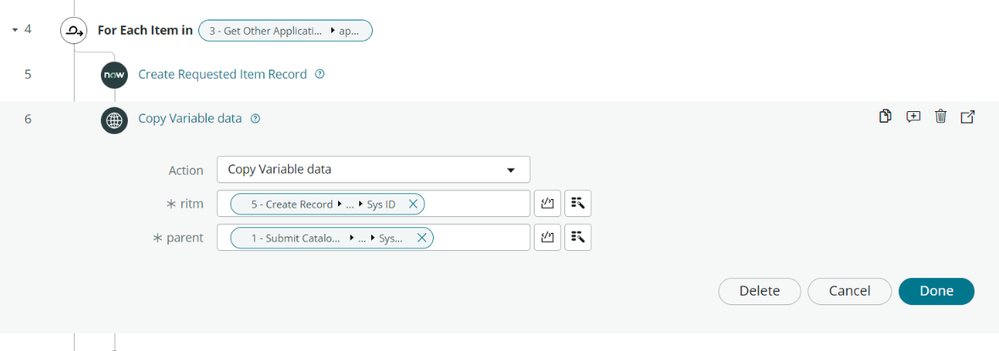
So i used create Record for sc_req_item and use the request field. So ritms are created and linked to the same request.

However, variables are not passed into the RITM. So for this i have created a custom action which will take the variables from the initial RITM and copy it to the newly created RITMs.


When i ran this, then the output will look like this.

After the request is approved, then we can see more RITMs for the same request.

Let me know if you have any questions in the comments below.
Mark the article as helpful and bookmark if you found it useful.
https://www.servicenow.com/community/developer-articles/create-ritms-for-existing-request-through-flow-designer/ta-p/2484617