
Field Type Visibility - Email and Image
Hello Community Members,
A few days ago, I tried to create the email Field type, however in that particular case, I am unable to see that field type. In order to learn more about the problem of visibility in field types, I dug further and deeper. You can use the procedures listed below to create field types like email or image that may not be visible in the system.
First of all you will required security_admin role in order to this.
Click on elevate role and enable security admin role
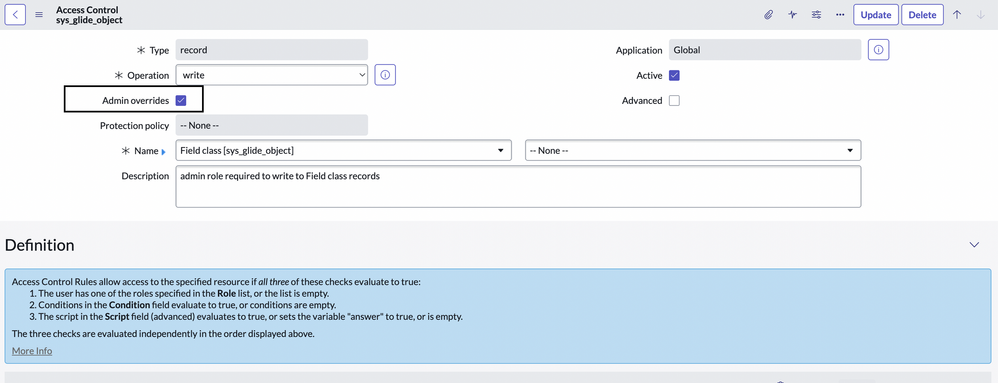
1) Check the checkbox of 'Override admin' from 'sys_glide_object' for write ACL :-

Fig.ACL for Field Class Table
2) Navigate to the sys_glide_object table and search for Email and make it visible true :-

Fig. Email Field Visibility
3) Now try to create the field on the table as type email :-

Fig. Email Field Type Creation
Follow the same steps for Image type and other non visible field types.
Value added in your knowledge ??? Then please mark it as helpful, bookmark it for future use and also share it with your ServiceNow squad.
Regards,Gunjan Kiratkar
Community MVP 2023
Community Rising Star 2022
Youtube : ServiceNow Guy
https://www.servicenow.com/community/developer-blog/field-type-visibility-email-and-image/ba-p/2388655