
Connect to Preferred Language Live Agent
Connect to Preferred Language Live Agent
Usually when we click on connect to live agent the user get redirected to the live agent
1) based on language of user in profile with same language chat queue
2) same language chat queue and available live agent.
Now, what if user wants to interact with the Live Agent with different language than the user's language set in user profile? this article will explain you, how to do this with very small customizations.
we have OOB Topic in Virtual Agent named "Transfer to Live Agent" which routs the user to available live agent.
Now follow below steps
step 1:-
Duplicate the OOB Topic Transfer to Live Agent
Give suitable name to the topic
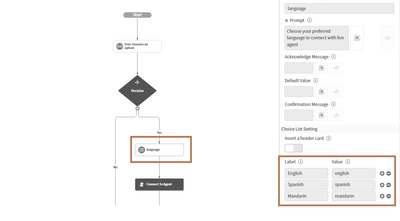
add an static input activity after the decision utility in your duplicated topic as follow.

Post this we have to add one script action utility after this activity as shown below

embed the below script in the script action activity.
var gr = new GlideRecord("sys_user");
gr.addQuery("sys_id",vaInputs.user.getValue());
//language is the backend name of static activity which provided language option to user.
gr.u_virtual_transfer= vaInputs.language;
vaSystem.connectToAgent();
Now , I am assuming that you have all your chat queues ready for different language service desk teams in chat queue. i.e Application nav-->Advance Work Assignment-->Queue

Now make adjustment as shown in below image to your language queue as, peroform .walk openedfor.Virtual Transfer followed by your language queue respectively.

Create a new choice field in sys_user table. as per your wish, you can make it available on form later or not.

Replace OOB Transfer to Live Agent with your Duplicate Topic in all the Topics where you want user to connect to live agent.
You can review my other Articles as below
Uses of hasRole() Methods (client and server side)
Order a Catalog Item via Virtual Agent
Connect to Preferred Language Live Agent
ServiceNow Community MVP 2022
https://www.servicenow.com/community/developer-articles/connect-to-preferred-language-live-agent/ta-p/2372372