
Handling 'text/plain' and Other Unsupported Content Types in ServiceNow Scripted REST APIs
 Tim Woodruff
Update, Jan 15, 2020: Added a section at the bottom to cover how to handle the application/x-www-form-urlencoded Content-type.
If you’ve ever tried to set up an AWS/SNS integration, you know that ServiceNow fails (rather spectacularly) to handle certain standard REST API request “Content-Types”; most notably, text/plain.

In this article, we’re going to discuss what happens when you you try to integrate with something that’s trying to send a plain-text payload, and how you can make it work. At the bottom of the article, we’ll have a simple Script Include that you can import into your instance to get around this issue, and make your plain-text integrations work.
The Problem
To illustrate the issue, I’ll wake up my PDI, and set up a Scripted REST API (SRAPI) that’s meant to accept a plain-text payload. I’ll include the steps to set this up, in case you want to follow along in your own PDI.
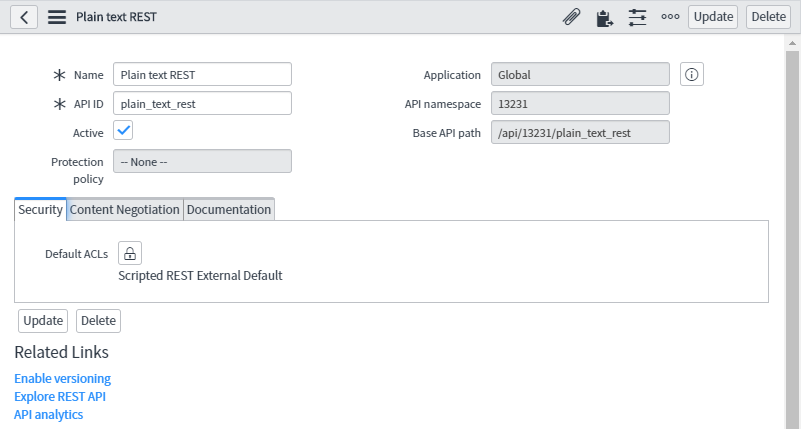
First, in the Application Navigator, I’m going to open up System Web Services > Scripted Web Services > Scripted REST APIs. On the corresponding list view, I’ll click New, and create my new REST API. I’m calling mine “Plain text REST”, and setting the API ID to “plain_text_rest”.
After saving this SRAPI record, I need to create a new REST Resource, so in the Resources related list, I’ll click New. I’ll name the new resource text-test, and set the HTTP method field to POST.
In the Content Negotiation form tab, I need to check the Override supported request formats checkbox, and set the Supported request formats field to text/plain (otherwise, it’ll reject any plain-text requests without actually running the code in my SRAPI).
Finally, I’ll put a really simple script in the Script field, that just logs the contents of the request itself:
(function process( request, response) { gs.log( request.body.data ); })(request, response);
After saving the Resource record, it should look something like this:
And that’s about all there ought to be to it - but if you’ve tried this yourself, you know that we’re not done yet.
To demonstrate the problem, I’ll fire up Postman, create a new POST request, set my Basic Auth credentials to a test user account that I created in my PDI previously, add a Content-Type header and set it to text/plain, add some plain ol’ text to the body, and hit Send.
{ "error": { "message": "com.glide.rest.domain.ServiceException: Service error: attempt to access request body is not allowed when request method is GET or DELETE", "detail": "" }, "status": "failure"
}
Hang on a minute, what’s this? The response body contains an error, but the error doesn’t make any sense!
attempt to access request body is not allowed when request method is GET or DELETE
But my request method isn’t GET or DELETE — it’s POST!
Maybe if I have a look at the error logs in my instance, it’ll say something more sensical.
…Then again, maybe not. Somehow, that’s even less helpful; and it still gives me that weird error that talks to GET and DELETE requests:
com.glide.rest.domain.ServiceException: Service error: attempt to access request body is not allowed when request method is GET or DELETE
So what’s going on here?
Well - I have no idea. My guess is that it assumes that the payload is going to be in one of the formats that it understands (XML, JSON, etc.) and if it doesn’t match any of those patterns, then by some rube-goldberg-esque process, it somehow falls through into some condition that fires off this error and then gives up.
Unfortunately, this is a “hard error”, by which I mean that it actually halts execution. This means that the error halts execution of my script, and none of the code after the line that triggers the error, is actually run. This is a big problem, since the line that triggers the error is the line that simply accesses the body (request.body.data).
After a lot of fiddling, I figured out that it isn’t accessing request.body that’s triggering the error - it’s specifically request.body .data. If I remove the line of code that’s attempting to access the .data property, the error goes away (but of course, then I can’t do anything with the request). The same problem occurs if I try to access request.body.dataString as well. I assume that’s because the error is happening within the Java “getter” method being run on Mozilla Rhino (the Java-based implementation of JavaScript that ServiceNow uses to run JS on the server). This means that maybe I can pull the data out of the request body myself, without ever accessing that property directly.

The API documentation for the RESTAPIRequestBody object mentions a property called dataStream, which it says you can pass to “a separate API” - without ever mentioning what that API is, or even telling us what type of object this property returns, or telling us how to actually use it or demonstrating its usage in the “example”…
Thanks, ServiceNow. ಠ_ಠ
After slamming my forehead against the problem for a while, I finally identified that the type of object that request.body.dataStream contains, is a GlideScriptableInputStream (great name, guys 👌). That class of object is, of course, undocumented (as far as I could find), but I was able to find one relevant method which accepted that type of object as an argument - GlideTextReader.
Armed with this knowledge, I put together the following Script Include which has one method that’ll get the contents of any plain-text REST API request body I’ve thrown at it:
var RESTPlainTextUtil = Class.create();
RESTPlainTextUtil.prototype = { initialize: function() { }, getTextBody: function(request, trim) { var reqBodyLine; var reqBodyString = ''; var streamBody = request.body.dataStream; var gtrRequestBodyReader = new GlideTextReader(streamBody); reqBodyLine = gtrRequestBodyReader.readLine(); while(typeof reqBodyLine == 'string') { reqBodyString += reqBodyLine + '\n'; reqBodyLine = gtrRequestBodyReader.readLine(); } return trim ? reqBodyString.trim() : reqBodyString; }, type: 'RESTPlainTextUtil'
};
After saving that Script Include and updating my REST Resource script to the following, everything works perfectly!
(function process( request, response) { gs.log( new RESTPlainTextUtil().getTextBody(request) ); })(request, response);
And the plain-text contents of the request are logged as expected:
There is another Content-type which triggers the error mentioned above: application/x-www-form-urlencoded.
com.glide.rest.domain.ServiceException: Service error: attempt to access request body is not allowed when request method is GET or DELETE
Unfortunately, if we use the new RESTPlainTextUtil().getTextBody(request) method to get the contents of requests of this type, we will always get a blank string; even when the request method is POST, and the body is not blank!
In this case, ServiceNow treats the body of the message as though the data were URL/query parameters. Even when that’s not the case. That’s a little bit annoying, but now that we know that, we know how to access the body of REST messages using the application/x-www-form-urlencoded Content-type: Simply use request.queryParams to get an object with key/value pairs corresponding to the data that would otherwise be in the body.
Unfortunately, there is no way (that I’ve yet been able to find) to access the exact, original text of the body of the message, which means that signature-based message verification would not be possible. This is a rare and specific use-case, but if you’re trying to integrate between ServiceNow and something like Chargify’s webhooks for example, you won’t be able to do signature-based verification of those messages without the original message body in its original serialized characters.
If you find this as annoying as I do, open a HI ticket and let them know, or post your suggestion to fix it in the community.
To install the above Script Include in your instance, simply follow the steps below:
- Download this XML file
- Navigate to your instance’s sys_script_include table
- Right-click on any of the table column headers on the Script Include table
- click “Import XML” (Not “Import”, but “Import XML”)
- Click Choose File, and select the XML file you just downloaded
- Click Upload.
Thanks for reading! If you enjoy our articles, don’t forget to subscribe! You can find some of our YouTube videos here, and you can find my books here.
Feel free to connect with me on Twitter and LinkedIn, and if your company needs some ServiceNow help, you can book a free, no-pressure consultation to discuss rates and how we can help you, here.
- March 2024
- February 2024
- Feb 12, 2024 5 Lessons About Programming From Richard Feynman
- July 2023
- May 2023
- April 2023
- December 2022
- Dec 13, 2022 ServiceNow Developers: BE THE GUIDE!
- October 2022
- August 2022
- March 2022
- February 2022
- May 2021
- April 2021
- February 2021
- November 2020
- Nov 17, 2020 SN Guys is now part of Jahnel Group!
- September 2020
- July 2020
- January 2020
- Jan 20, 2020 Getting Help from the ServiceNow Community
- December 2019
- November 2019
- April 2019
- March 2019
- February 2019
- Feb 27, 2019 Making Update Sets Smarter - Free Tool
- November 2018
- October 2018
- September 2018
- July 2018
- Jul 23, 2018 Admin Duty Separation with a Single Account
- June 2018
- May 2018
- May 29, 2018 Learning ServiceNow: Second Edition!
- April 2018
- March 2018
- February 2018
- Feb 11, 2018 We have a new book!
- November 2017
- September 2017
- Sep 12, 2017 Handling TimeZones in ServiceNow (TimeZoneUtil)
- July 2017
- June 2017
- May 2017
- April 2017
- March 2017
- Mar 12, 2017 reCAPTCHA in ServiceNow CMS/Service Portal
- December 2016
- November 2016
- Nov 10, 2016 Chrome Extension: Load in ServiceNow Frame
- September 2016
- July 2016
- May 2016
- May 17, 2016 What's New in Helsinki?
- April 2016
- March 2016
- February 2016
- January 2016
- December 2015
- October 2015
- August 2015
- Aug 27, 2015 Easily Clone One User's Access to Another User
https://snprotips.com/blog/2019/11/18/handling-textplain-and-other-unsupported-content-types-in-scripted-rest-apis